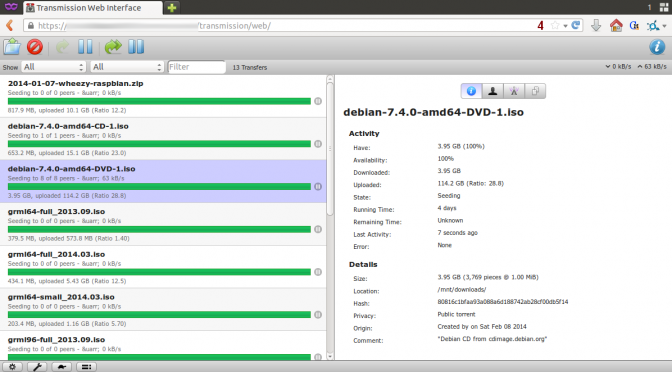
i’m using transmission for my regular bittorrent needs. it has a nice simple interface and can even be run as a daemon on a server. therefor it even offers a nice looking web interface.
Note: if you are running gentoo or a system that uses the xdg-utils with xdg-open, you might want to look at this howto.
since my working machine is not always running but my server is, this is where transmission is set up.
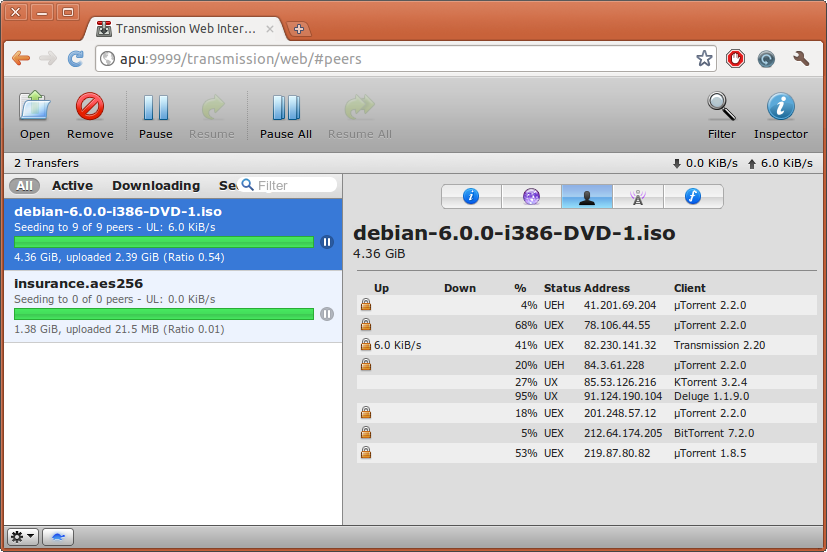
the web interface provides a nice mask to setup your torrents. you can upload a .torrent file (to your remote machine) or just an URL of a torrent or most recently a magnet link. this is very handy since you don’t need to handle any .torrent files locally. just copy that link and you are done.
when you are running a torrent client directly on the machine you pick out your torrents clicking on the magnet link will most likely start the download immediately without having to copy that link. this kind of comfort was missing with the remote version of transmission.
so i hacked around to solve that.
setup your remote transmission daemon.
then you need a little script that calls the ajax function the web interface provides to ‘upload’ the magnet link.
this is what i came up with:
#!/bin/bash
test -z $1 && echo "need magnet link!
$0 <magnet link>" && exit -1

HOST=YourRemoteHostNameOrIP
PORT=YourPort(default is 9091)
USER=User
# NOTE: I had issues using passwords with semicolons (;) in them,
#       you might want to stay away from them
PASS=pass

LINK="$1"
# set true if you want every torrent to be paused initially
#PAUSED="true"
PAUSED="false"
SESSID=$(curl --silent --anyauth --user $USER:$PASS "http://$HOST:$PORT/transmission/rpc" | sed 's/.*<code>//g;s/<\/code>.*//g')
curl --silent --anyauth --user $USER:$PASS --header "$SESSID" "http://$HOST:$PORT/transmission/rpc" -d "{\"method\":\"torrent-add\",\"arguments\":{\"paused\":${PAUSED},\"filename\":\"${LINK}\"}}"
the last thing you need to do is tell your system what to run when you click on a magnet link.
adapting this forum tip you need to run:
gconftool-2 -t string -s /desktop/gnome/url-handlers/magnet/command "/path/to/your/script/from/above/magnetLinkTransfer.sh %s"
gconftool-2 -s /desktop/gnome/url-handlers/magnet/needs_terminal false -t bool
gconftool-2 -t bool -s /desktop/gnome/url-handlers/magnet/enabled true
that’s it. now click on any magnet link and transmission will intercept it and will start it automatically on your remote transmission-daemon.
i used transmission-daemon version 2.31 (12441) for this. it should work on newer versions as well. have fun.
19 replies on “How to open magnet links on a remote transmission daemon with one click…”
Thanks a lot!
Worked like a charm, after I realized that I didn’t have curl installed…
thank you
works great, thanks for this. was about to figure out the curl command when i thought “surely someone has done it and posted it” 😉
[…] daemon which handles the torrents and accepts requests of all sorts of clients. you can even pass magnet links you clicked, from your desktop to the remote daemon with a little […]
I am seriously and brutally loving this!
Can I achieve the same result when my girlfriend (windows & chrome user) clicks on her magnet links?
i don’t know how to put a custom script in the windows magnet link handler. i’m glad i don’t have to use and know windows 😉
the call to transmissions API stays the same.
Hey Pitto, I just set this up on Firefox using greasemonkey add-on and this javascript here: http://userscripts.org/scripts/show/68700. You will need to edit the js file and add the IP and port for your remote transmission (in my case my readyNas duo) – no transmission password seems needed.
If all goes fine, next time you load PB for example, you will be able to click on the magnet link gif and the script will add it to your remote transmission, showing a pop-up.
https://code.google.com/p/transmisson-remote-gui/
[…] asks for permission to open a magnet link i posted a how to on a similar solution about one and a half years ago. this time we configure xdg-open to do the […]
For a bit more control and aesthetic replace the last line in the script with:
RESPONSE=$(curl –silent –anyauth –user $USER:$PASS –header “$SESSID” “http://$HOST:$PORT/transmission/rpc” -d “{\”method\”:\”torrent-add\”,\”arguments\”:{\”paused\”:${PAUSED},\”filename\”:\”${LINK}\”}}”)
RESULT=$(php -r “echo json_decode(‘$RESPONSE’)->result;”)
if zenity –question –text=”$RESULT” –title=”Transmission Remote GUI @ $HOST” –ok-label=”Go to Transmission”; then
sensible-browser “http://$HOST:$PORT”
fi
[…] previously posted there are ways to use magnet links with transmission’s web interface. This webinterface works well when you are on your local network aka LAN and don’t have to […]
For the windows users, here’s a powershell script that shows how to send a magnet link to a remote transmission daemon:
http://poshcode.org/6361
I didn’t used transmission’s web interface.
I just edited /usr/bin/xdg-open adding an option to call transmission-remote to add the magnet link:
open_generic()
[this is a session inside /usr/bin/xdg-open]
(…)
elif (echo “$1” | grep -q ‘^magnet:’); then
transmission-remote -n username:password -a “$1”
if [ $? -eq 0 ]; then
exit_success
fi
perfect use for ‘transmission-remote’, although it requires you to install it on your client.
I recently started getting this error.
Any ideas? Been reading up on the 409 errors and its confusing.
409: ConflictYour request had an invalid session-id header.To fix this, follow these steps: When reading a response, get its X-Transmission-Session-Id header and remember it Add the updated header to your outgoing requests When you get this 409 error message, resend your request with the updated headerThis requirement has been added to help prevent CSRF attacks.
I tried adding a sound to the script, but it’s not working, can somebody help?
I simply put this at the end of the script:
paplay “/var/scripts/scriptcomplete.wav”
It works fine at the command line but nothing plays when the browser runs the script.
Thanks for this! I’ve based an applescript app on this for myself – in case anyone else is trying to achieve the same https://gist.github.com/noodny/f5fe42f4f871bf9b4c804ddcbb09ccf9
Is there any way to also make it ask for the download location?
Add the variable
DLPATH=”/path/to/download/location”
and modify the curl statement as follows to add download location
curl –silent –anyauth –user $USER:$PASS –header “$SESSID” “http://$HOST:$PORT/transmission/rpc” -d “{\”method\”:\”torrent-add\”,\”arguments\”:{\”paused\”:${PAUSED},\”filename\”:\”${LINK}\”,\”download-dir\”:\”${DLPATH}\”}}”